Ask for changes on a proof
Drop numbered pins right on the proof where each change goes, or write a general note.
If something needs to change, tell the designer right on the proof. Pins are the clearest way: one pin, one change.
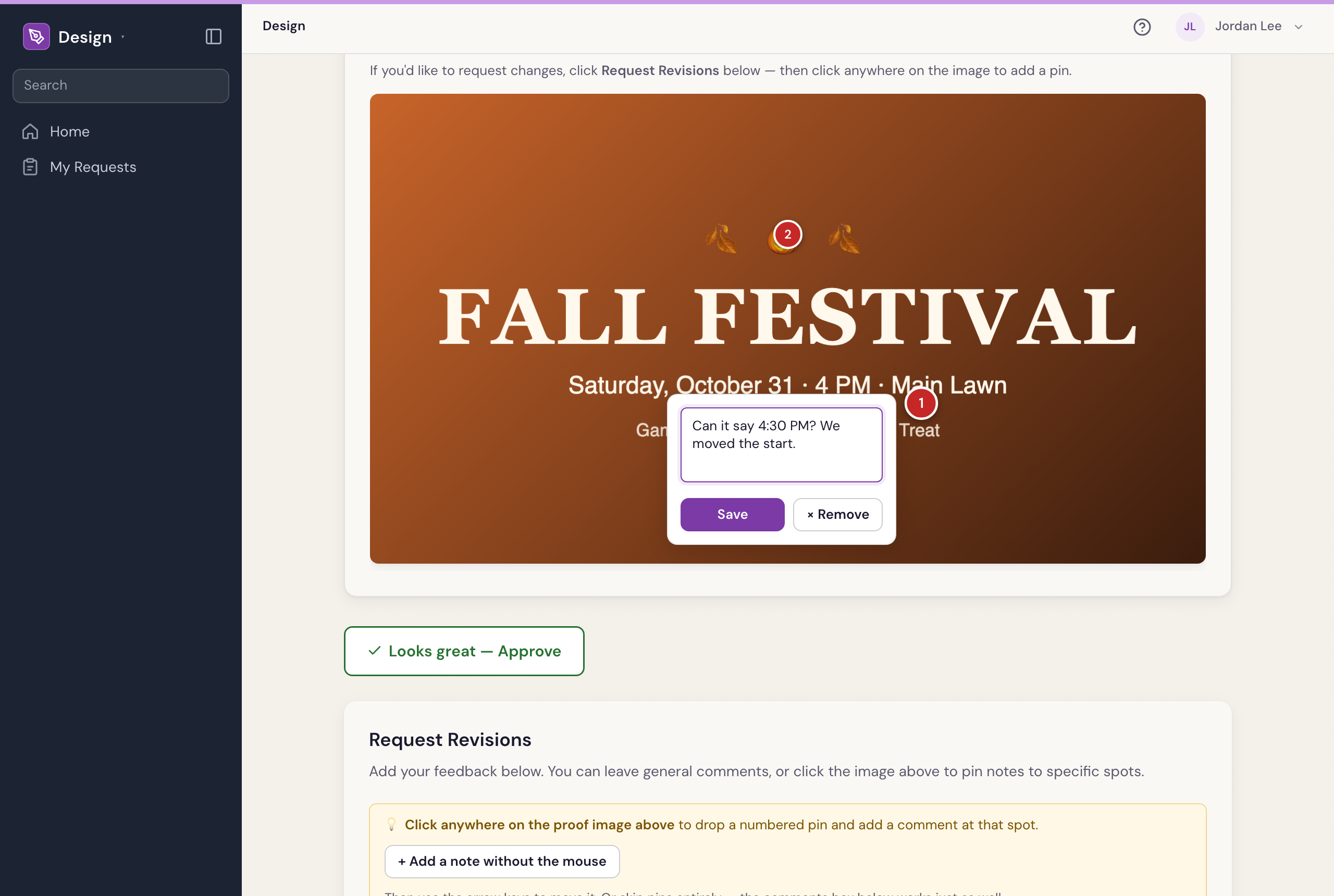
Pin each change
- On the proof page, press Request Revisions.
- Click the picture exactly where a change goes. A numbered pin appears.
- In the box beside it, say what needs to change, for example “Change 6 PM to 6:30 PM”.
- Repeat for each change. To take a pin off, press its ×.
- Press Submit Revisions →.
You’ll see Revisions submitted! The designer gets your notes and sends you a new version.
A general note instead
Rather not use pins? Write in General comments and leave the picture alone. Either is fine, and you can use both.
Show an example
Have a picture of the look you want? Add it under Reference image (optional) (up to 10 MB). The designer sees it with your notes.
A PDF
On a PDF proof, click the page to drop a pin. Use ← Prev and Next → to move between pages and pin each one.
When the new version comes
The new proof shows your earlier notes underneath, each marked ✓ Addressed when the designer has dealt with it.
Was something here unclear, or out of date? Email design@revival.tv or use Something unclear? at the bottom of the page.